
Productivity

New iPad 3 Dodo Cases!

In a compulsive move that should surprise no one, last night I ordered this new Dodo Case for the iPad 3.

I am loving the grey linen exterior! I also made sure to order it with the camera hole cut out, which set me back an extra five bucks, but I did pass on the custom monogram/personalized text option. I’m still a bit unsure if this case uses magnets to activate the iPads sleep/wake function, but I am not to concerned about that because I prefer to swipe to unlock anyway. Dodo case announced a few different styles, so be sure to check them out at dodocase.com

Getting Things Done with my iPad and Apps

For the past week, I have been utterly obsessed with trying to implement The GTD system! I don’t have the book, but there is a plethora of information on the Internet. I recently purchased this awesome fake snakeskin case from Target for just $16! I really like it because it is folio style with a zip around closure, multiple pockets and a pen/stylus holder. Only negative is that the elastic straps block parts of the corners of the iPad. Overall, however, I find that the case has been great for keeping me organized and on top of my work.

Now, if you too are interested in GTD and getting your work and your life organized I have a few links I found useful listed below.

GTD FAQ

GTD Clear out your inbox

{Happy GTDing}

Moleskine New 2011 Collection

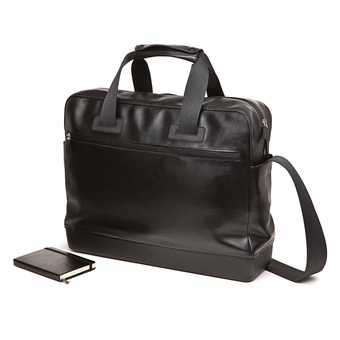
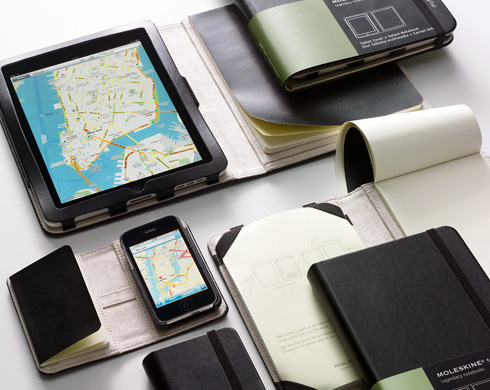
About a week ago, Moleskine released it’s new collection of goods which included not only new versions of their popular journals, but also a travel collection consisting of laptop/work bags, a writing collection consisting of notebook attachable pens and pencils, and a reading collection featuring reading glasses and a book/ereader stand. Their new collection, geared towards the “modern day nomad” blends the elegant styling of the Moleskine brand with the digital vs analog dichotomy faced by the creative and intellectual journalist. As an avid Moleskine enthusiast, I was eager to try out a few items from the new collection and immediately ordered myself the classic rollerball pen and refill, as well as the book/ereader stand.

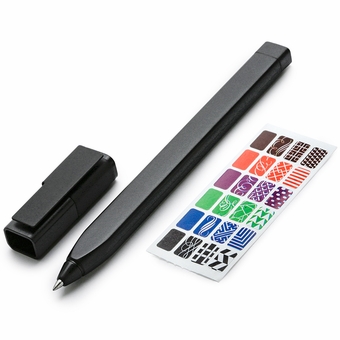
The Classic Rollerball Pen ($15) is a bit more expensive for it’s quality than I expected. From the images online I would have thought the pen to be a sturdy or solid feeling pen, however, it is very lightweight and feels a bit cheap. It writes effortlessly, which is a plus, but the real reason the pen may be worth its high cost is the custom metal cap that holds the pen to the hard cover of a Moleskine journal. I denote hard cover here because this pen does not seem to be meant for the thin cover of the soft Moleskine collection. However, the pen does sit very nicely on the Moleskine when attached to the hard cover, and is the length of a pocket sized Moleskine. The pen attaches nicely on both the pocket and large sized journals and stays put via rubber lining on the metal clip. Overall, the pen is a bit expensive, but I believe worth it for the convenience of having a well designed pen always attached to my Moleskine.

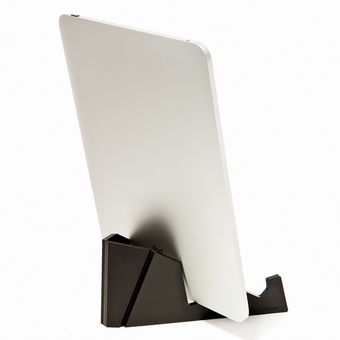
The E-Reader Stand ($18) is much more of a disappointment to me than the pen. It isn’t that the stand feels cheaply made, on the contrary it feels sturdy in the hand, made from a thick molded plastic with a textured finish that aims to mimic the exterior of a Moleskine. My problem with the stand is that its design is overly simplistic. When it comes to using my iPad with this stand, which is what this was clearly designed for as evident in the stock photos of the product, its very hard to do so with certain cases on the iPad. Now, the iPad in the photos are without a case, but I think that it is a bit unrealistic to create a stand without taking iPad cases into consideration. The only cases that really work with this stand are very simple hard shell type cases, and as someone who prefers the use of folio cases, I was very disappointed. The only one of my folio cases I could get to work with this stand was ironically my Moleskine inspired Portenzo case. Now, iPad cases aside, their is one other gripe I have with this stand and it is that it is also being marketed as a book stand, and in the photos Moleskine shows the stand holding up a large sized hard cover journal. I tried to get the stand to hold up my large sized journal, but it just did not work the way you see it in the pictures. Instead of holding the journal at a nice angle for reading, the journal seemed to slip through the stand. However, when I tried this trick with a pocket journal the stand did hold it up properly, and when I tested some other books, things were either hit or miss, but mostly a miss. Overall, I am very disappointed with the functionality of this stand. I purchased it because I liked the idea of a dual iPad and journal stand for work, but it is not living up to the reputation of a Moleskine product.

What’s in my bag 2.21.11

What's in my bag 2.21.11

Since I am home from work today for the President’s Day Holiday in the U.S., I decided that I should refresh my flickr feed with a new “what in your bag” picture. Since I bought the iPad early last summer, it has pretty much completely replaced my Macbook Pro in day to day use. Since I no longer carry around a full out tech bag, I recently purchased a new spring tote for my lighter tech load. It took me a long time to find a bag that was both fashionable and practical for carrying my expensive toys, but ultimately I ended up choosing this Gia Milani large tote from Target. It was a complete bargain for just $36 and it has a nice sized center zippered compartment that fits my iPad perfectly and makes an inconspicuous hiding spot for it.
Contents (Left to Right, Top to Bottom):
3G iPod in it’s silver business card case
Silver Zebra camera case
Bronze oversized wallet
Bowers & Wilkins P5 Headphones with pillowed carrying case
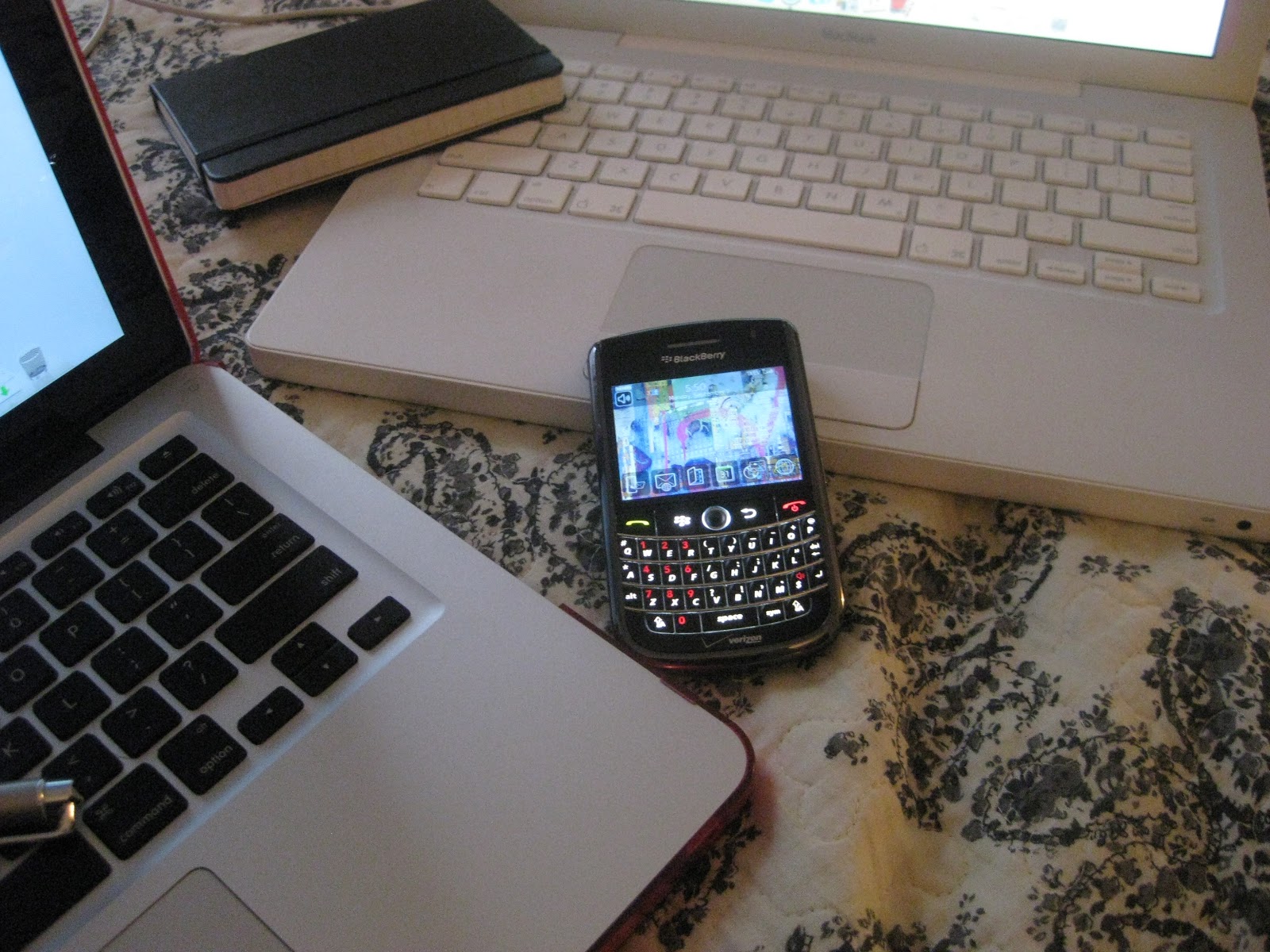
Blackberry Tour
Baggu in Peacock
Large Ruled Moleskine
16gb Wifi Apple iPad in SGP Argos case

NaNoWriMo Victory 2010!

Good news everyone! On Tuesday I finally completed NaNoWriMo, hitting the 50k word mark making 2010 another NaNo success for me! I know I was away from the blog for the whole month of November, but I actually found this NaNoWriMo a little more difficult than last years. The novel I wrote this year required so much more research than my prior year’s novel and it ended up taking up much of my time just figuring out all the specifics I needed to get my story rolling in certain parts.

This NaNoWriMo, however, was not a complete success for me šŸ™ I actually ended up giving up on attempting to write the novel on my iPad a few days into the project. It really wasn’t the iPad’s fault fully. I was having no trouble with the data input, but the issue I had was that I love Scrivener and I wanted to continuously update my novel to a Scrivener file I had created for it and the going back and forth teased me with all the great functions Scrivener has to offer and I ended up forgoing the iPad so that I could write my novel with the Scrivener app. I actually fully attribute my two NaNoWriMo wins to Scrivener because it makes it so easy to write and keep track of your text and your research that it seems silly not to use the program. I really wish that Scrivener would develop an app for the iPad, but I believe Literature & Latte has already come out saying they have no plans to create such an app. Pity, because I have been looking for an Scrivener like substitute to write on my iPad on the go, but nothing seems to be as functional as the true Scrivener application so I have been disappointed each time.

In defense of the iPad as a writing tool, I did find it very useful when I was writing and during my off time when I was researching because it was like having a second computer screen that I could pull up information in. I would frequently find myself sitting with my iPad and my moleskine notebook writing down details for the book that I found online. I also started using the application DropBox for syncing of documents between my iPad and Macbook Pro. My DropBox account served as a backup system for my Scrivener file for the book which was great because I could pull up the document on the iPad and review sections when I wasn’t writing or at my Macbook.

Overall, although this NaNoWriMo was more of a challenge for me, I ended up learning alot and finding some great little tricks for my iPad. I still believe the iPad is a great aid for writers on both short and long form projects, but until the right applications are created that cater to it’s strong points I will have to stick to Scrivener on my Macbook, but I’m okay with that šŸ™‚

Moleskine Cases for iPad and iPhone to come!

I was so excited when I first saw this yesterday! As you may already know, Moleskine recently released a case line for the Kindle and Kindle DX, but now they are adding to their line iPads and iPhones! This will be the perfect hybrid of Moleskine and iPad and I cannot wait for them to be released. Prices haven’t been announced yet, but since the price of the Kindle DX case is coming in at around $60, I will assume that the iPad case could be no more than $75 dollars. That is quite a hefty price to pay, however, I am sure the die hard Moleskine fans out their will not hesitate to order them once they become available!

I will keep you updated as to my order status!

Back to School Tech Tips


With the end of summer nearly upon us, these next few weeks of August will see college and high school students on their way back to the daily grind of classes and coursework. If you are one of the many students heading back to the classroom, you may be in the market for some new tech gear. The start of a new school year has always been ceremoniously entangled with the concept of the “new,” and the prospect of new gadgets can always make for an exciting start. However, if you are one of the many students who will be dragging around an old laptop or iPod, don’t worry, because I have some tips for making your old tech feel new again to get you pumped for your upcoming semester.

Add a little spring to your gadget’s step

Although your laptop may be well equipped with a fast processor and a large hard drive, it may not be as snappy as it once was. This is a common issue with computers in general, but luckily it is an easy issue to fix as it is most likely related to a clogged hard drive. Months or years of accumulating files and viewing web pages can cause your computer to run significantly slower, so to fix the problem, you will need to start cleaning out your files.

1. Start by going through your documents, pictures, music and movie files and getting rid of any files you no longer need. For files you don’t use but need to keep record of, move those to an external hard drive to free up space.

2. Next, try clearing your web browser’s cache. This will take care of old web page information that is stored on your computer and eating up memory. To do this, go to your browser’s preferences or settings and look for the option.

3. Finally, delete unused applications. To do this on a Mac, you simply need to drag the application to the trash can, however, to insure you have removed all the sub files of the application from your hard drive, I suggest downloading an application such as AppCleaner or AppDelete to help you remove all associated files. On a PC, use the application uninstaller in your Control Panel found in ‘Add or Remove Programs’.

4. For an iPod that is beginning to lag, I suggest that you do a factory reset of your device, then, make sure you have the most up to date firmware installed, before restocking your device with new tunes and videos for the school year. Although iPods tend to have a shorter lifespan than laptops, with proper care and maintenance, you can keep yours up and running for a long time. (I still have an iPod Mini from early 2005 in good working condition.)

Give your gear a bath

Although they are electronic devices, computers and mp3 players still need proper cleaning from time to time to keep them not only looking good, but also working well. When dirt or dust gets inside a gadget, it can start causing issues like overheating and lagging that shorten the life of the device. So, a regular cleaning is always a good idea.

1. The first thing to remember before you begin to clean any electronic device is that you must turn the device off. Skipping this step could cause major harm to yourself or the device. So, power down and unplug all wires.

2. I tend to begin cleaning my laptops keyboard area first. This is usually a source of much dust and dirt that should be cleared out of the way first. Use a can of compressed air, or, if you know how to remove your keys individually, do so slowly and carefully. I like to use q tips to get into the nooks and crannies of the keyboard, myself.

3. Next, clean off the casing. Depending on the outer material of your laptop, either plastic or metal, you may want to use a dedicated electronics cleaner like iKlear, but I find that soap and water or antibacterial wipes do a universally good job. If you are using soap and water, just make sure that you only slightly dampen the towel you are using to make sure you don’t get liquid into the delicate parts of your computer.

4. Finally, clean the screen of your computer with an appropriate cleanser. To be prudent, I would check with the manufacture of the computer to see what solvents are safe to use on the computers screen. Although Windex is always a safe bet, you may prefer to use electronic screen wipes or another popular brand of computer screen cleaner if your screen has any sort of sensitive coating.

5. Follow a similar method to clean an iPod or mp3 player, making sure to also clean your earbuds with a q tip or cotton ball slightly moistened with alcohol to remove bacteria.

Update your electronic wardrobe

You’re not the only one who could benefit from a wardrobe upgrade for the new school year. A great way to make your old tech feel new again is with some upgraded cases, covers, and skins. There are a wide variety of retailers that sell these items, most specified to the specific device you own, so I will not list them here, but I will say that a new sleeve for your laptop, or a new case for your iPod can be an inexpensive way to add excitement and interest back to your gear. Not to mention upgrading the protection will extend the life of your device!

The Pink Mac’s Holiday Gift Guide 2009!

The Pink Mac's Holiday Gift Guide 2009
Now that the holiday season is finally here, it is time for The Pink Mac’s Holiday Gift Guide. This year has been groundbreaking in many ways in regard to consumer electronics, and especially Apple products. We have seen some amazing bumps in product standards and at the same time some big price drops which have made gadgets and accesories even more affordable! So, I have put together a list of some of the best and most interesting Apple related accessories and products out on the market today, taking into consideration quality and price to ensure that you are giving only the best and most unique gifts this season!

Gifts for Mac’s

Hu2 Design Laptop Decals: These vinyl laptop decals are unique and durable; a sure way to brighten up any Mac user’s holiday!

Fabrix Laptop Cases: The usual brand of laptop cases can get boring, so instead, consider Fabrix cases; they’re handmade and made from unique fabric designs that are sure to spread the holiday cheer!

Apple’s Magic Mouse: For any mouse using Mac user in your family, Apple’s Magic Mouse has all the familiar gestures of a trackpad with the functionality of a mouse!

Gifts for iPod’s

iSkin Nanovibes: Give the gift of unique iPod protection with these interesting patterned cases!

Richard Solo 1800 for iPod: For the avid iPod user in your life, consider this backup iPod power source- small and compact- perfect for the ipod user on the go!

Belkin Rockstar: Does your ipod lover like to share their music? Then this is the perfect gift for them, allowing for up to 5 users to experience the tunes!

Apple Sidekicks

Nook: This well designed e-reader looks the part of the Apple lineup, and with it’s simple touch screen design, it puts other e-readers to shame!

Canon Powershot: There is no doubt that Canon makes some of the best compact digital camera’s out on the market, and this compact design is the perfect gift for any photo lover!

Bose Headphones: What is all the great audio technology good for if you can’t experience it full throttle? These bose headphones are compact enough for use at home or on the go and will surely strike a chord with any music or movie lover in your life.

Stocking Stuffers

Monster Screen Cleaner: Keeping your gadget’s LCD screens clean is always important for frequent users, so stuff some of this in their stockings to keep all their gadets looking new!

Pogo Sketch: Whether it is the touch screen of a iPod or trackpad of a Macbook, this inexpensive accessory is a perfect stocking stuffer for your gadget lover, and cheap enough for you to splurge on yourself!

Netflicks Gift Subscription: Who needs on-demand movies and expensive extra channels when, for less than the price of a single DVD, you can have access to an entire movie library and streaming DVDs online?

Macbook Pro Display Issue.

So, I have been noticing this weird issue my Macbook Pro has been having- basically, every once in a while when I am on battery power and I leave my computer idle for a while, when I get back the colors on the screen are messed up. This doesn’t happen every time I leave the computer unplugged and out of use, but it has happened a few times and so I wanted to make you guys aware of how to quickly fix it!

Organize your Mac with these 5 Tips!

Now that fall is in full swing, it is the perfect time to organize your digital life. So, I have put together a list of 5 easy to implement tips to help you clean out your computer and reorganize your files, a must on the To Do list of any student, working adult, parent or retiree this season!
{Note: Before you begin the process outlined within this post please make sure to back up your computer files using Time Machine or whichever method you prefer. The tips here are only suggestions and this blog is not responsible for any files you may mistakenly loose or delete in the process of implementing them!}
Let’s begin, shall we
1. DELETE, DELETE, DELETE
If you want to clean out and reorganize your Mac, the first and best thing to do is delete all unnecessary files, folders, programs, ect, from your hard drive. This could take time depending on how much you have stored on your hard drive and how much you want to erase.
For applications, I recommend using a program like AppCleaner to get rid of the program and all associated systems files in one action. It is a free download, so you might want to hang on to it for future use.
It might also be a good idea for you to clear your Safari cache as well. To do this, open Safari and from the menu select, Safari > Empty Cache > Empty. If you use another web browser you should still be able to do this, but consult their help menu for proper instructions.
2. File Away
After you have deleted the files you no longer need, you must reorganize the ones you still want to keep. Although OS X does a great job of providing a built in organization system for different types of files like movies, photos or documents, it is still up to you to keep these files straight within their selected locations.
For instance, if you took a trip to France and you have a bunch of photo’s just sitting in your Pictures file, organize them by creating a new file called ā€˜Trip to France’ within Pictures to keep them together for easy location later. It is easier to store photos in a named file then to put names on each individual photo, as you can always add those later after you have them organized into a group.
3. Put it in Storage
There may be some files you want to keep as a backup, but don’t want taking up space on your hard drive, so to solve this problem I use an external hard drive. I do this for all my iMovie projects once I have uploaded them to the web, because I want to keep copies of them as a backup, but I don’t need hundreds of movie files crowding up my hard drive. By storing them on a separate hard drive, I know I can retrieve the files whenever or if ever I need them.
4. Become an Avid Reader
If you’re like me and like to read a wide variety of websites and blogs, you probably also have a mass of links bookmarked in Safari that you just sift through as you’re surfing. Well, to make this process easier and much quicker, you may want to download an RSS/Atom reader like NewsFire.
With this simple application, you can add a long list of RSS feeds and just click through each article you want to read. This saves you the time of having to load up each page and gives you the benefit of having the title of each article laid out so that you can pick and choose which you would want to read without having to scroll through multiple pages of a blog or site. Using a RSS reader like this also gives you the ability to read your favorite sites while you are offline as well, so long as you refresh your feed before you go offline!
5. Get Things Done
Many of us use our computers to organize not only our work but also our family and personal lives simultaneously. This may result, however, in a chaotic mess of information, to do’s, links, recipes and whatever else you need scattered throughout multiple places on your computer.
So, to get all your tasks done and all your information in one place, use a program like iGTD. With iGTD you can organize your tasks by context or projects, separating work tasks, home tasks, family tasks, etc, with a built in organization system of calendars, places for notes, web links, and whatever other information you will need to complete your tasks.
{Congratulations! If you have followed these 5 tips successfully, you now have an organized Mac fit and trim to see you through all the hard work of fall!}