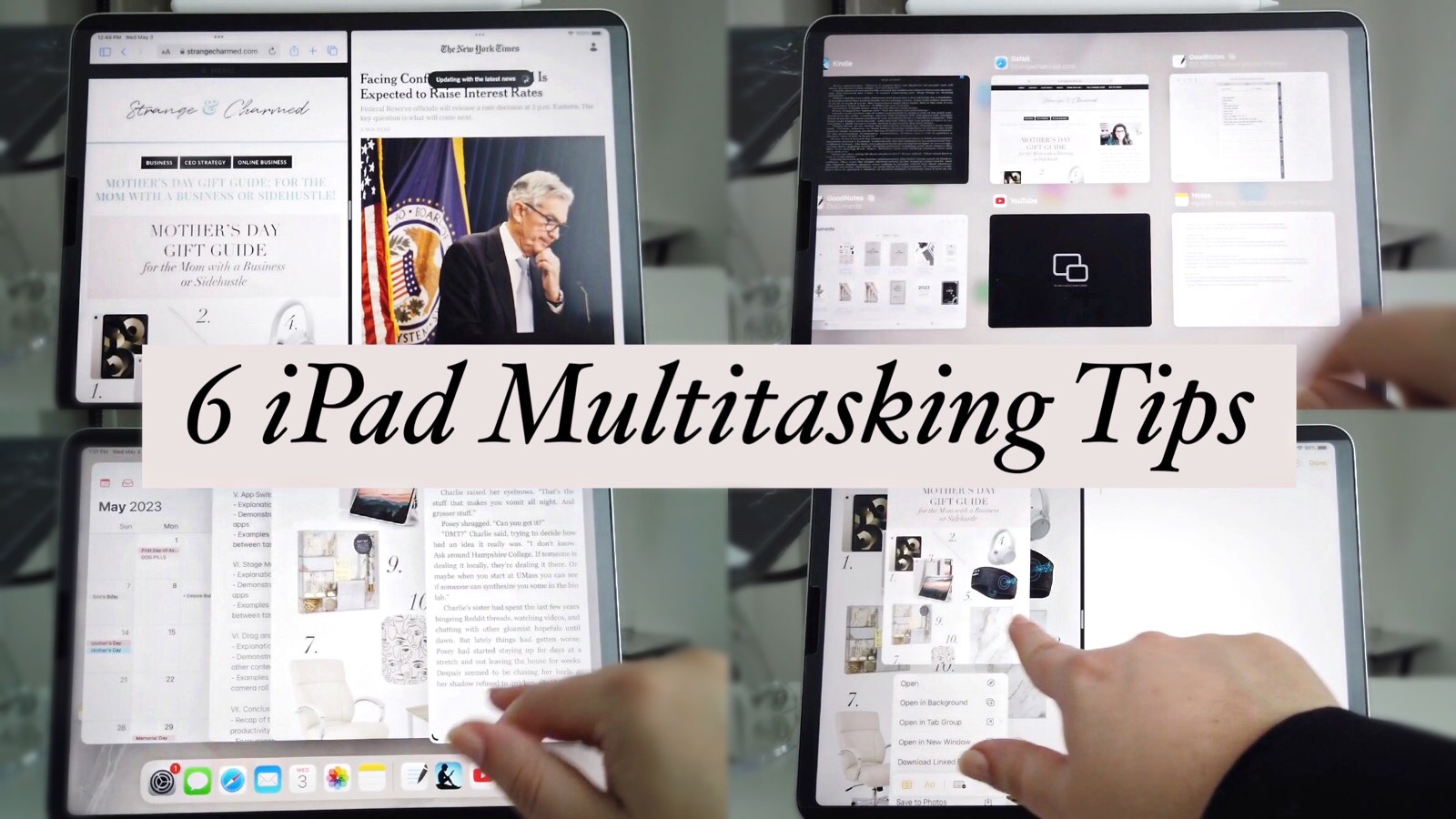
How to Master Multitasking on the iPad | 6 Split Screen Features to Know and Use
If you are using an iPad as a device to work and get things done, there are some essential multitasking capabilities of the device you need to know about. Since the iPad OS is different than a traditional computer with floating windows, it’s not as seamless to have multiple apps and projects open to switch between on an iPad unless you know about these key multitasking functions. Multitasking is important on the iPad because it allows you to be more efficient and productive when working on different tasks simultaneously.
With multitasking features such as Split View, Slide Over, and Picture in Picture, you can have multiple apps open and actively working on them without having to constantly switch between them without your apps closing out when you move into a new app. This means that you can easily take notes while watching a video or respond to emails while working on a document. Multitasking on the iPad also saves time and helps you stay focused on your work, ultimately leading to increased productivity and better results.
So, what are the Multitasking functions and capabilities of the iPad?
The iPad has a range of multitasking capabilities that allow users to work on multiple tasks simultaneously, making it a powerful productivity tool. Today I am going to cover the 6 features you need to know about. They are Split View, Slide Over, Picture In Picture, Apple Switch, Stage Manager and Drop and Drop.
When you learn to use and integrate these multitasking functions into your daily iPad workflow, you are going to see your productivity skyrocket on the device.
Watch the Video Tutorial on How to Multitask with the iPad
I hope this video taught you some new ways to get use and productivity out of your iPad! I’d love to hear which multitasking function you use the most in the comments. Also, if you have any more questions about how to use your iPad Productively at work, please let me know and I’d be glad to create some content to answer the question or solve the issue for you!
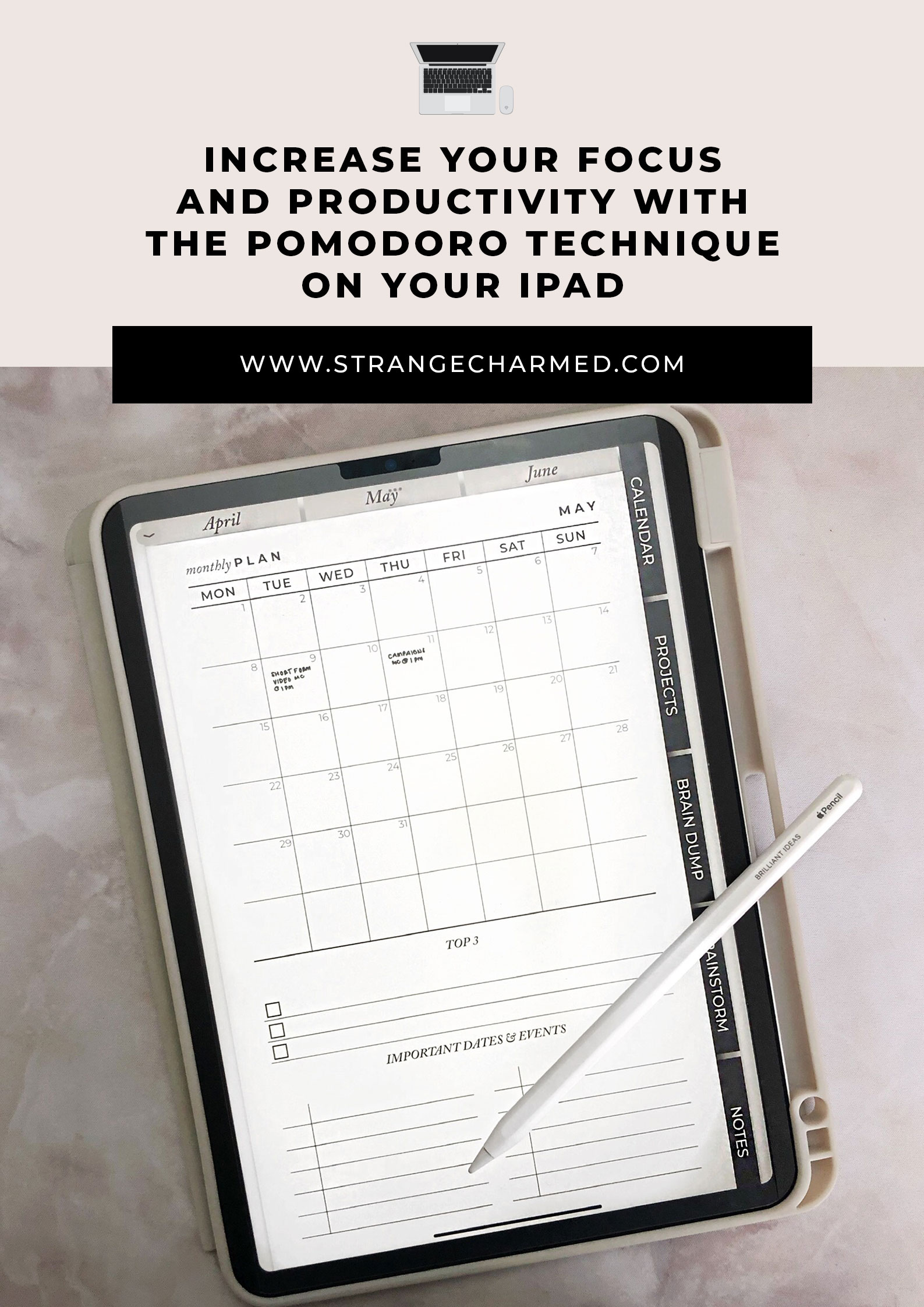
Increase Your Focus and Productivity with the Pomodoro Technique on Your iPad
The Pomodoro Technique is a time management strategy that can help you increase your productivity and stay focused on your work. The technique involves working for a set amount of time, typically 25 minutes, then taking a short break. You repeat this cycle four times and then you can take a longer 30 minute break. Repeat this cycle of work and breaks throughout the day to increase your productivity and get things done. In this post, we’ll explore how to use the Pomodoro Technique when working on an iPad.
Step 1: Choose a Pomodoro App
The first step to using the Pomodoro Technique on your iPad is to choose a Pomodoro app. There are many apps available on the App Store that can help you implement the technique. Some popular options include Focus Keeper, Be Focused, and Pomodoro Timer. These apps typically feature a timer that counts down the 25-minute work interval and the 5-minute break interval.
Step 2: Plan Your Tasks
Before you start the Pomodoro Technique, it’s important to plan your tasks. You should have a clear idea of what you want to accomplish during each 25-minute work interval. This will help you stay focused and avoid distractions during your work time.
Step 3: Set Up Your Workspace
To make the most of your Pomodoro work intervals, it’s important to set up your workspace for maximum productivity. Make sure your iPad is charged and ready to go, and that you have all the tools and resources you need to complete your tasks. You should also minimize distractions, such as turning off notifications and closing unnecessary tabs or apps.
Step 4: Start Your First Pomodoro Interval
Once you’ve chosen your Pomodoro app, planned your tasks, and set up your workspace, it’s time to start your first Pomodoro interval. Set the timer for 25 minutes and begin working on your task. During this time, avoid distractions and focus solely on your work.
Step 5: Take a Break
When the 25-minute work interval is up, the Pomodoro app will notify you that it’s time for a break. Take a 5-minute break to stretch, walk around, or do something else that’s unrelated to your work. This break will help you recharge and refocus for the next Pomodoro interval.
Step 6: Repeat the Cycle
After your break, it’s time to start the next Pomodoro interval. Repeat this cycle several times throughout the day, taking longer breaks after every four Pomodoro intervals. By using this technique, you can stay focused, avoid burnout, and increase your productivity.
The Pomodoro Technique is a powerful time management strategy that can help you work more efficiently and stay focused on your tasks. By using a Pomodoro app on your iPad, planning your tasks, setting up your workspace, and taking breaks, you can increase your productivity and achieve your goals. Whether you’re a student, a professional, or anyone looking to get more done in less time, the Pomodoro Technique can help you work smarter and achieve better results.
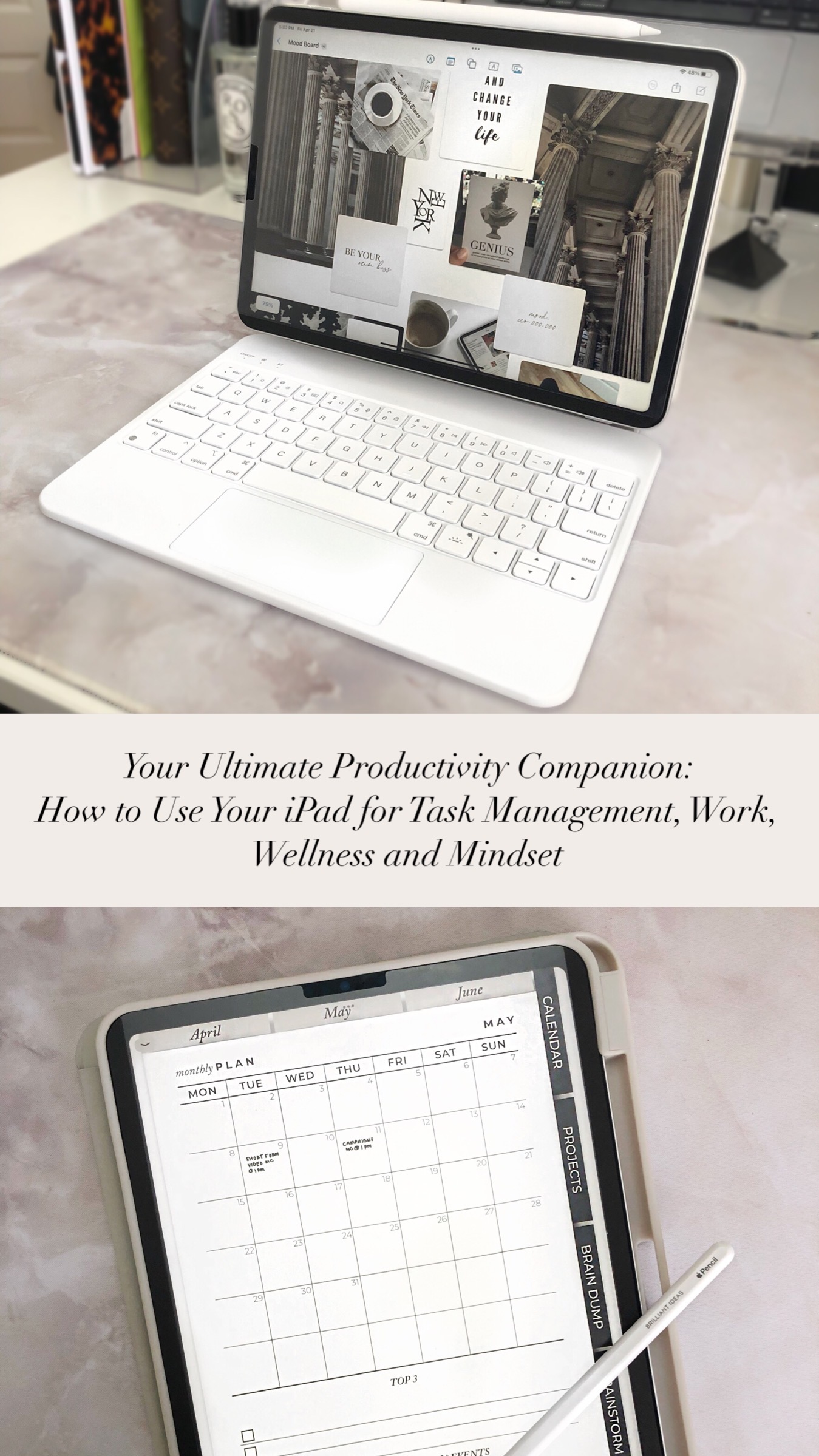
Your Ultimate Productivity Companion: How to Use Your iPad for Task Management, Work, Wellness, and Mindset
In today’s digital age, the iPad has become a versatile tool that can help you in almost every aspect of your life. From task management to personal development, this device can be a game-changer when it comes to productivity and growth. In this post, we’ll explore some of the ways you can use your iPad for productivity and personal development. We’ll cover topics such as task management, work, wellness, and mindset, and how you can leverage some of the best apps to make the most of your iPad. Whether you’re looking to stay organized, improve your focus, or enhance your overall well-being, there’s something for everyone in this guide. So, grab your iPad and let’s dive in!
Purchasing a new iPad Pro
A few weeks ago I purchased a new iPad and when I shared it on Instagram with my community many people wanted to know which iPad I bought, which iPad they should buy, and how I was planning to use it, so I am going to answer all those questions in this post.
So, first off, I purchased an 11” iPad Pro, the 128GB model and the 2nd generation Apple Pencil. To be honest, it was hard for me to choose which iPad to buy because for some reason Apple has a large number of iPads to choose from right now, and although I can’t tell you exactly which iPad to get, I do have a piece of advice for you to use that is the guide that I use when I am purchasing new tech, especially Apple products. My advice to myself and to you is to purchase the best model you can afford. I say that because for myself, I am very gentle with my tech gadgets and they last a long time, my last iPad is almost 10 years old so it was time for an upgrade- and I find with Apple products, they are so ahead of the times with the tech that when you buy the best model you can, it ends up lasting even longer. So, if you aren’t sure which iPad to buy, that is my recommendation. When it came to making my purchase, the iPad Pro was the best model available and I bought the size and storage capacity that I thought was right for me. Now, if you know which iPad you want already, I think that is the iPad for you, and if you can’t afford it right now, I do think it’s worth it to be patient and save for the one you want because if you settle I don’t think you will be as pleased with your purchase. So, if you are interested in an iPad that is how I recommend you go about purchasing one, now and in the future.
Now, do you actually need an iPad? That is totally for you to decide. For me, I know the iPad is a luxury, I don’t think it’s something any of us need to be productive or organized, but if you have the desire and means, it can definitely be a useful device. And because I am a rebel personality type, novelty can be a big motivator for change and improvement. I’m more likely to take action when there is an element of novelty involved and the iPad is absolutely a novelty device for me.
So, I bought the iPad with the intention that I was going to improve my productivity and hit some next level goals for myself this year! And to reflect that intention, I ended up ordering my iPad and pencil from Apple online so I could get them both engraved for free with a personalized inspirational message. If you weren’t aware, apple offers free engraving on some of their devices, so if you want to make advantage of that, you will want to order online instead of going in store.
So, now that we know which model I bought, and which model I’d recommend to you, let’s talk about how I am using this device to help me hit that intention to improve my productivity and personal development!
The first way I am using the iPad is for Task and Idea Management.
Right now, I am doing some parts of my planning process on the iPad since I have the pencil and I want to put it to good use. I have been playing around with digital planning, and I get why people like digital planning. In fact, I recently created some prototypes for a Digital Master Planner that I shared with the Charmed Life Master Mind members. The feedback I’ve been getting from them has been very positive, and of course I am also testing the digital planner out myself, but for the time being I’m not quite converted yet to digital personally. But I will fully admit that I love using the iPad to braindump, brainstorm and plan content. So, for this I’ve been using the digital master planner, and I optimized some of my inserts into PDFs for my iPad that I use in GoodNotes to get my ideas out of my head and onto digital paper. All that has been going well!
The second way I am using the iPad is for work.
Specifically, I use it to write posts in the Apple Notes app. Once I outline things in GoodNotes, I will use the split screen option and write out posts while looking at my notes and outlines. I also have used the iPad to send and manage emails; both my personal and business inboxes as well as my email marketing client. I have actually written and scheduled marketing emails from my iPad and the experience is doable on the iPad although I prefer the functionality that comes with sending marketing emails on my laptop.
I also use the iPad for research. I do a lot of reading and research for my work and so I use the iPad to read ebooks, articles, online publications, the news- I bought a NYTimes subscription so I could get full access to their articles and read them on the iPad which is a nice experience.
I also have the Slack App on my iPad so I can stay connected with my Master Mind, and answer their questions, share content and do coaching with them through the app.
So those are all the specific work tasks I do on the iPad. Some things I am not using it for work wise are design for inserts and graphics, editing audio and video for my YouTube and Podcast, and doing web development. I know some people do use their iPads for graphics and editing and it’s totally usable for those tasks, but because I have a MacBook Pro I find it easier to use my computer to do those tasks than my iPad. I watched a lot of videos on the topic and yes, plenty of people use their iPad for design and editing but most agree its a better experience on a computer, and for those who did use their iPad, it tended to be more useful for those who didn’t have a laptop and who traveled or worked away from their desktop computer. So, for me, I have a laptop, so I don’t need my iPad to be another mini laptop as well. I also tried to do back end work on my websites with the iPad and the functionality is hit or miss on the iPad OS, so that’s firmly something I will stick to doing on my MacBook pro.
The third way I am using the IPad is for wellness!
As I mentioned my intention for this device was for it to help me manifest some goals in my life and some of those goals are wellness related. Specifically, I have been for the last few months working on my fitness and I have a workout routine where I do strength training at home. I use the iPad, specifically the Freeform app, which is this wonderful digital white board app, to organize and plan out my workouts. I do a bunch of video workouts from YouTube and I’m able to pin the videos to Freeform and create my workout schedule that way and it’s actually been helping me stick to this routine because it’s keeping this goal organized for me.
Also in terms of wellness, I have been using the iPad for my meal planning and prep. Again using that Freeform app, I essentially map out my meals and pin recipe videos and articles to my meal planning board in the app. It’s a wonderful way to visually organize your meal planning- I love it!
The fourth and final way I am using the iPad is for Mindset!
The iPad has become my default journal. I’ve created some journals in Goodnotes out of my favorite insert designs and I’ve been journaling so much more with the iPad. I use some of the PDF workbooks I design for my mastermind like my mindset workbook and my astrological insights workbook in Goodnotes as well to journal and complete those activities which is really great.
I also keep a mood/vision board on the iPad in the Freeform app as well. I realize I could also make one on GoodNotes, but I like how that Freeform app allows me to pin videos and articles to the vision board as well as photos- it gives me a multimedia vision board experience.
One final thing I’ve been using my iPad for that I am filing under mindset is that I also downloaded a few chill games to play when I want to unwind. I’ve been playing more games on my Nintendo switch this year as a way to zone out and de-stress my mind and I found a few iPad games that were chill and vibey and relaxing that I downloaded as well. I’ve been playing Zen Sand, Osmos HD, Beatstar, Journey and Monument Valley.
So, that is how I’ve been using the IPad.
My Favorite iPad Accessories to Increase Productivity and Workflow
To help me get the most functionality out of the iPad, I purchased a few accessories for the iPad that I highly recommend. Check out the video below to see these productive iPad accessories in action!
Overall, the iPad can be a valuable tool for boosting your productivity and personal development. With its versatile features and wide range of apps, you can customize your iPad to suit your individual needs and goals. Whether you’re looking to streamline your workflow, organize your schedule, or learn a new skill, the iPad can help you achieve your objectives with ease and efficiency.
By using the iPad as a productivity and personal development tool, you can maximize your time, increase your focus, and stay motivated to pursue your goals. So if you’re ready to take your productivity and personal growth to the next level, consider incorporating the iPad into your daily routine. With a little bit of effort and creativity, you can transform your iPad into a powerful tool for self-improvement and success.
When I work with students from within my community it is inevitable that they will come to me believing they have one issue to work on for their productivity, and through our time together, I am able to identify that they are actually struggling with something completely different.
This is so common!
Most of us have a hard time clearly understanding where we are struggling with our productivity and because of that, we often seek out information and strategy that when we put it to use, isn’t making a difference to us.
It’s because we are focused on the wrong aspect of our productivity.
For as long as I’ve been making productivity and planning content, one thing I have always wanted to do is create a resource to help my community clearly identify what their productivity issues really are so they can spend more time focusing on what will help them make a true impact in their life.
So, if you feel like you are not as productive as you believe you can be, or you are putting in effort but still struggling to get the outcomes you desire for your life, the Productivity Assessment Workshop is a resource you do not want to miss!
THIS WORKSHOP IS FOR YOU IF:
→ You feel like you aren’t as productive as you would like to be. You know there are strategies and tools to fix this but you aren’t sure where to start.
→ You feel frustrated researching techniques on your own and want to know exactly what you should work on improving.
→ You’re feeling confused. You take a lot of productivity and planning advice you hear but it doesn’t seem to make much of a difference.
→ You feel overwhelmed. You just want to feel more in control of your time and life without having to read every new book and follow every trendy new strategy.
IN THIS WORKSHOP YOU WILL:
✔︎ Assess your productivity based on self-reported feedback, NOT an arbitrary standard.
✔︎ Answer a simple set of 50 questions, 10 for each of 5 productivity categories.
✔︎ Learn the 7 Core Productivity Competencies and how developed you are in each.
✔︎ Clearly identify what areas you need to work on in order to see and feel an improvement in your overall productivity
✔︎ Create a simple action plan for how you will address any areas you feel need improvement.
STOP wasting time working on the wrong elements of productivity and planning.
START getting clear on where you need to develop time and task management skills!
Now isthe perfect time to check in with yourself and see where your baseline productivity score is at by taking the Productivity Assessment!
Once you know where you are at, I can better help support you to improve with targeted strategies and information!
✔︎ You have reviewed your progress from 2022, celebrated your wins, made peace with your shortcomings and let go of anything you don’t need to take with you into 2023.
✔︎ You know what your goals are for 2023 for both your personal life and business.
✔︎ You have a plan laid for what you need to do to make your goals happen and have set aside the time to complete the work.
✔︎ You feel like your life is together. Like the successful, productive and organized person you know you are.
2023 IS YOUR YEAR!
→ You can walk into 2023 with a well organized plan to get things done OR no plan and not enough time for you to finish your to do list.
→ You can have a balanced daily routine with room for all the areas of your life OR feel rushed and overwhelmed day to day pushing aside your personal goals yet again in favor of other priorities.
→ You can live life at an intentional and productive pace OR deprive yourself of sleep, space and self care to cram in every single task for the day.
Which situation would you prefer?
MAKING 2023 YOUR BEST YEAR YET IS YOUR CHOICE!
I know which choice I would prefer, which is why for the past decade I have intentionally dedicated time at the turn of the New Year to set my goals, map my plans and get my life and vision organized!
And guess what?
Because I spend a little time planning my vision for the year, I achieve more with less time and less stress.
I want you to embrace this process as well because I know first hand through my own experiences, as well as working with hundreds of women from my community, that this works!
And I believe you intuitively know this works as well, but you just haven’t found a system and a process that yields consistent results for you.
That’s why it’s time you choose THIS IS YOUR YEAR!
THIS IS YOUR YEAR is my step by step process for outlining your vision, setting the right goals and breaking those goals out into actionable steps you can take throughout the year to achieve those goals and experience your best year!
THIS IS YOUR YEAR is a series of four goal setting workshops, replays of live classes I taught exclusively to my inner circle master mind, that will help you organize and prepare your life and business for a productive year ahead.
The bundle includes the video modules, slides, workbooks, my 2023 You Got Goals Planner, and bonus guided meditations.
I’VE ALSO JUST ADDED A NEW BONUS MODULE TO THE BUNDLE
The 2023 VISION BOARD PARTY Workshop | Learn how to create and use a Vision Board to manifest your goals this year. This video module teaches you the neuroscience of how Vision Boards work, provides the step by step for how to create your own, and explains what to put on your Vision Board based on your unique personality. The video module also includes a Vision Board Builder PDF that you can print and use to add style and intention to your Vision Board!
THIS IS YOUR YEAR IS EVERYTHING YOU NEED TO SET YOURSELF UP FOR SUCCESS IN 2023!
And I want to remind you that there is nothing wrong with you and your life right now!
You are not lacking.
You are not behind.
You don’t need to change your life based on external expectations or comparisons.
You are completely whole and worthy right now exactly as you are.
If you are like me, I truly crave the feeling of ease and comfort of knowing that I have a plan for the year that allows me time for work and space to play.
I love my life, I experience deep gratitude for it, and at the same time, I want to experience more of what life has to offer me.
There is nothing wrong with being grateful for what you have and at the same time desiring more or even different experiences.
I set personal goals because I want to better myself and create a better life for myself and those around me.
I set business goals because I want to reach and help more women like you identify and experience their potential in life as well.
But those experiences don’t happen by accident.
You need a vision, a direction and a plan to fit them into your life.
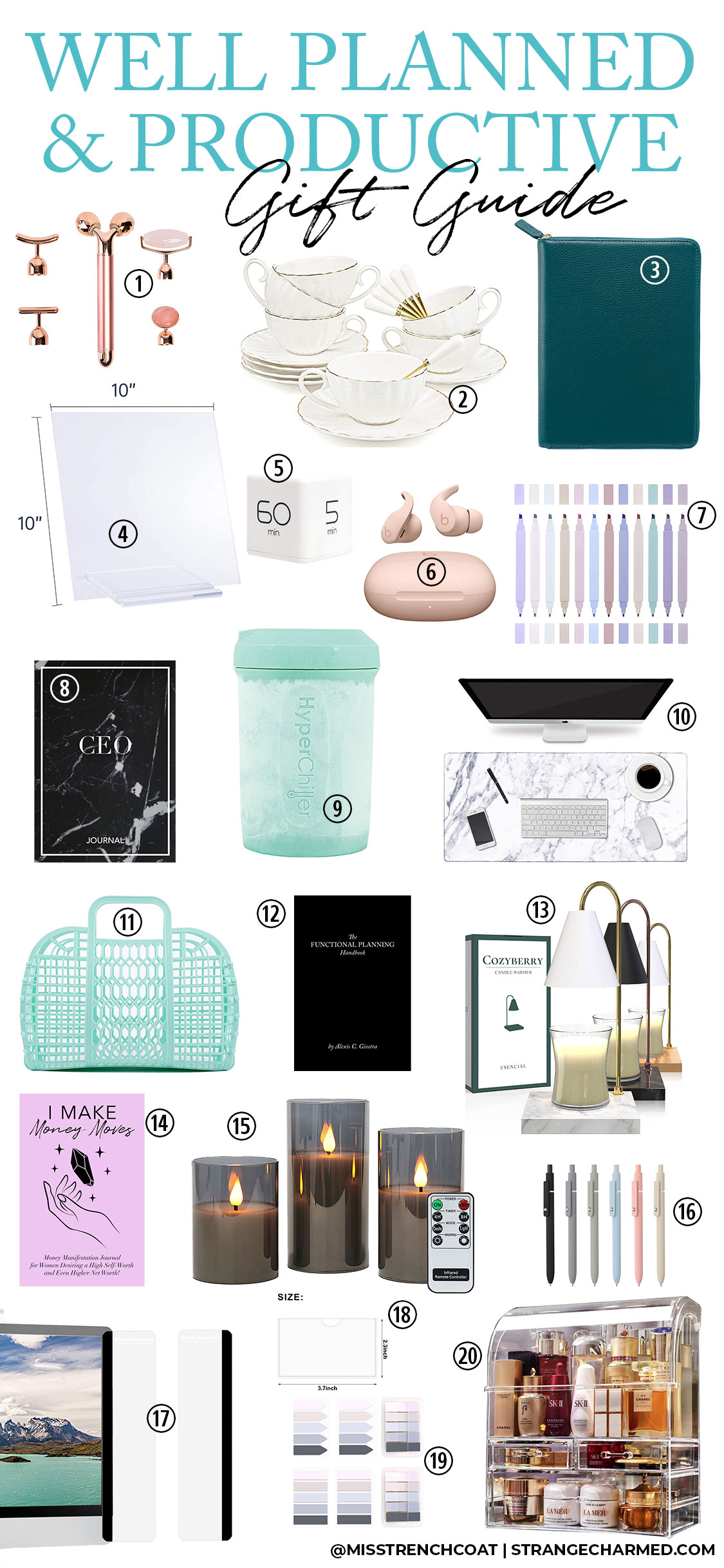
It’s that time of year again!! The holiday season is approaching and it’s time to shop for gifts for the special people in your life. I love giving gifts- it’s one of my love languages and so I love creating gift guides with new and creative ideas to help you find something unique and functional for the people on your list.
I have created a new gift guide specifically geared towards planning and productivity presents that you can give to a planner lover, co-worker, or female entrepreneur you are buying for this year. Or of course, you could forward this gift guide on to the people who are buying for you this year if you see some things you like and resonate with.
These gifts are priced across the board- some are more of a splurge and some are stocking stuffer price. Most of them are $50 or less so they are pretty reasonable gifts.
I love a good facial roller tool and this five in one option is a great way to make the most of multiple tools to help de-puff, sculpt and sooth your face. Use this massager to relax your muscles, apply serums and tone your face through lymphatic drainage massage. This is a great tool to use morning or night, or anytime you want to relax and pamper yourself.
Stop drinking your daily coffee or tea from clunky old mugs and elevate your daily experience with this set of 6 cups with saucers and stirrers. It’s a beautiful set with classic and luxurious lines that will bring some extra elegance and refinement to your workday. Just add your favorite biscotti or croissant!
This chic leather cover can be used to protect your choice of planner or notebook in a compact and secure housing. I love the way a zip cover keeps it’s contents protected, especially on the go and I am particularly enamored with this dark green teal color. This is a gift that makes a major impact on your style, planning and productivity.
An acrylic dry erase board is a perfect accessory for your kitchen, home organization station or office. Use it for notes, announcements, meal planning or reminders.
This adorable cube desk timer is the perfect productivity tool to help keep you on track and working in short bursts or blocks of time. Set the timer before you start a task to track how long it takes for planning purposes, and use the timer to set aside time to get started on a project or task you’ve been putting off.
These Beats Fit Pro Wireless Bluetooth EarPods have been my go to for both work and play. The noise cancelation technology helps me to stay productive while I work and listen to my favorite lo-fi jams. They are wonderful for working out and physical activities, and I love to wear them while I listen to a meditation or relax in the bathtub. Plus the color palette on the Beats x Kim Kardashian collection are gorgeous!
I think my number one most used planning and note taking accessory, aside from a pen, has to be dual tip highlighters. I use them to highlight dates and information, to create check boxes for tasks and to block off time in my daily schedule. I love this set of neural and pastel highlighters because they create a relaxing tone inside your planner as opposed to traditional neon highlighters that look like strobe lighting and often give me a headache looking at it for too long.
If you are looking for an affordable and chic notebook or bullet journal, the CEO Journal has everything you need to organize and plan in one simple bound book. The undated pages allow you to select the date and organize information with the help of a square grid. The pages are numbered for you to keep an index if you’d like to track important spreads or information. And yes, it does fit nicely into the Pebbled Leather Zip cover linked above!
If you are an iced coffee or tea fan and have not heard about the HyperChiller yet, I am about to blow your mind. Fill the dual chambers of this unit with water, let it freeze in your freezer and then whatever hot or boiling liquid you pour into the chiller will cool down in one to two minutes. No more watering down hot beverages to get them cool. This is one of my favorite kitchen gadgets, no wires, no batteries or electricity needed. Just water, your freezer and a hot beverage to chill down.
I love this marble desk pad- I don’t think I could work at a desk without one of these desk pads anymore because they act as decoration, a mousepad and a soft place to rest your hands. I have a few of these desk pads with different patterns on them and I switch them out for the seasons to give my home office and desk a new vibe.
As someone who works from home, I have a lot of productivity tools that I tote around the house with me whenever I decide to work from outside my office. I love these little jelly baskets because the large size fits my laptop, planner, notebook, phone, headphones, pens, highlighters and more so I can take my home office into any room of my house. I call it my mobile office basket and if you work from home, either full time or even part time, you will love having a simple tote like this to use to corral your things securely instead of trying to carry everything by hand yourself.
If you are looking to get the most from your planner system, you absolutely need to learn the Functional Planning Methodology and this book is the official handbook that covers everything you need to know to set up, organize and use your planner to manage your life, plus tips on how to stay motivated and productive through the day.
I love filling my home with candles, but as a pet owner, it isn’t always the safest to have candles burning throughout my home. So, using a candle warmer is a must and these warmer lamps are the perfect blend of style and function to give you some extra home decor, and a safe way to use your candles without lighting them.
If you want to be a more productive and successful person, you absolutely need to start a journaling practice. I think getting your thoughts out of your head and into paper is so important, and especially keeping track of your thoughts and self-talk are a major factor in what you manifest and bring to fruition in your life. This journal will help you manifest more money and abundance into your life through a daily journaling practice where you get clear on what you want, your own value and your plan for making things happen in your life.
These remote controlled flameless LED candles are the perfect addition to your bedroom, home office or bathroom. They are a safe way to create mood lighting and help you get cozy at home, helping you to relax and destress from a busy day.
If you are a planner and productivity lover I know you have a thing for pretty pens. This set of neutral matte gel pens is very aesthetic and certain to help you create a planning or journaling routine that fits your energy and vibe. Why use ugly pens when you can use a chic option like these?
I don’t personally use a desktop computer with a separate monitor, but I have seen so many videos and examples of people using these monitor memo boards and I think they make an awesome accessory for your home or office. You can attach this set of memo boards to the side of your monitor to organize sticky notes or to use as a dry erase. And I bet you could use these on other surfaces besides your monitor. You could affix these to the sides of a mirror in your bathroom, your refrigerator or cabinets in your kitchen- anywhere you need to organize notes and some information- these adhesive memo boards would work!
I know these self-adhesive business card pockets seem so random for a gift guide, but they are actually one of my new favorite planner supplies. My planner cover doesn’t have a ton of business card holders built in, and so I have been sticking these pockets onto dashboards on my planner to organize business cards. I don’t use mine for business cards, instead I use them for planning/journaling cards to decorate my planner and to add a little more inspiration.
As someone who is more into using my planner for function than decoration, I don’t use very many accessories in my planner. However, another one of my planner must haves are this set of neural transparent tabs. I use these to mark pages in my planner for reference and also to write out a note or reminder for my planner before it is set in stone. I love the colors in this set and that it includes pointed and squared edge options. I also use these tabs when reading in physical books or to notate documents I am reviewing or editing.
I know it might seem odd to see an acrylic makeup and skincare organizer on this gift guide, but there are a few reasons I wanted to include this. First of all, getting ready in the morning or getting un-ready at the end of the day is an essential part of your daily routine and having your necessities organized and visible like this helps you to remember to do this important self care each day. Also- I think this organizer would also be awesome to use in your office to store stationery and planner supplies. Think of this as a beautiful display case for your office with all your favorite stationery organized inside.
I hope you have enjoyed this gift guide and that it gave you some great inspiration for this holiday season!
Today, I have something very exciting to share with you!
As we are about to step into the Holiday Season, this is the time of year we often see Advent Calendars making their way around the internet and into our local shops.
For many people, Advent Calendars are a really fun and festive way to enjoy the season leading up to Christmas, and I myself have bought a few in the past to celebrate the season, and of course to relive that childlike wonder of opening a little door or a little box each day with a lovely little surprise inside.
And for a few years now, it has been on my to-do list to figure out a way to create my own Advent Calendar for my community… a Productivity Advent Calendar.
I’m pleased to announce that this year I have finally done it!
This is a first of it’s kind Productivity + Planning Advent Calendar that you can open virtually online. It includes 24 PDF downloads that you can print and then add to your 2023 Planner Setup!
The downloads included with the Advent Calendar are a mix of inserts and other printable productivity and planning tools intended for you to use to create your own custom planner for the New Year.
What You’ll Find Inside:
A mix of 2023 dated and undated inserts
Decorative and functional dashboards
Planner organization tools
Inspirational lists and decor items
Functional and beautiful planner accessories
A set of print instructions for the items in the calendar
Print these files at home as much as you’d like (or take them to a local print shop if you prefer)
The insert designs are half letter sized, however, they can be printed at Half Letter, A5, US Letter or A4 with an included set of print instructions you will find on the Advent Calendar Page. There are also some PDFs included in this bundle that are meant to be printed at Full Letter or A4 specifically- this will be explained in the print instructions. I also recommend to make the most of this bundle you have a paper trimmer, hole punch compatible with your planner binding system of choice, card stock, full sheet label paper and 3”x3” sticky notes.
All designs included with this Advent Calendar are unique, and are not sold separately or found in any of my other offers or programs. If sold separately, the designs would total $250 in retail value so purchasing this Advent of Productivity Calendar is a major value!
The Digital Advent Calendar itself resides on its own page of my private membership site, which you will get access to join upon checkout with your Welcome Letter PDF.
Open a “box” per day leading up to Christmas (or the seasonal holiday or date of your choice) or, feel free to open all the boxes and download all 24 of your productivity tools at once to get your planner set up for the New Year.
Take a look at the beautiful page I designed for the 2022 Advent of Productivity Calendar, with it’s 24 holiday boxes you can open to reveal your daily functional planning tool!
I am overjoyed to bring you this new and unique Advent Calendar in celebration and preparation for Christmas and the New Year!
I sincerely hope the tools inside the calendar help you to create your own sense of Planner Peace with a customized setup and unique inserts to help you manage and organize your life in a more systemized way.
THE 2022 ADVENT OF PRODUCTIVITY CALENDAR IS NOW ON SALE
The sales page includes further details about your purchase including a list and preview of the 24 Planning Tools inside Calendar- but be careful if you don’t want to spoil the surprise of what is inside for yourself!
High Vibe Garden Party Soundtrack for Relaxation, Self-Care & Your AM Routine
I have a new productivity resource I’d like to share with you!
This past weekend on Youtube, I published a lovely soundtrack of classical music with a nature ambience that is perfect for you to play if you need to relax, do some much needed self-care, perform your morning routine and do some quiet reading or journaling.
I call it the High Vibe Garden Party because that is the energy I get from the music and ambience I’ve layered together in this soundtrack. Click here to listen to the soundtrack now!
Music has such a powerful effect on our minds, our bodies and our productivity, because it can very quickly shift us into feeling a specific way. So, do yourself a favor and use this soundtrack this week as the background music to your life to start leaning into a more relaxed an intentional energy.
I’m going to be creating more of these soundtracks this month to help support the energy you need to embody at specific points in your day, so I sincerely hope you enjoy them!
> Your internal rhythm may be off after a weekend of relaxing that makes getting back into the weekday routine both a mental and physical challenge.
> Monday’s kick off the work week for many of us, and that means having to face our likely overwhelming to do list, plus having to do that job or interact with some people we may not be particularly fond of.
There are actually lots of reasons why Monday’s are hard for us, but I want to help shift that Manic Monday story in your mind into the anticipation and excitement of a potentially Magic Monday!
I’ve really come to love Monday’s over the past several years and truly get excited for the start of my week. So, I thought, it would be helpful for me to share a bit of inspiration and strategy for you to use to start shifting your mindset and organizing your week so that you too begin to look forward to Monday!
3 Questions to Ask Yourself to Set Realistic Expectations for Your Week
Let’s begin with your specific needs and expectations to determine what would make this week feel successful, productive and a little more organized.
Here are three questions to ask yourself to get clear on your own expectations for a productive week. Journal on these questions, write the answers out in your planner or simply ponder your responses as you prepare for your day- but do try to record your answers for reference and action.
Question 1: What needs to happen this week to make it feel productive and successful? Try to identify three things you can take action on that would make you feel like this week mattered.
Question 2:What drains on your time and energy do you need to watch out for and avoid this week? For each drain, think of a simple plan for preventing these obstacles or dealing with each if they arise.
Question 3:What can you do to support the best version of yourself this week? Think of a few simple habits or actions you need to take this week to make sure you are able to show up each day to the best of your ability. It may mean asking others for help, but you know what you need to show up at your full capacity, so don’t be afraid to ask.
The answers to these questions are going to give you some amazing insight into the few things you need to do to ensure your week feels successful and is supporting you in an effort to live your best and most balanced life.
I know it may seem counterintuitive at first, but the success and productivity of your week isn’t found in the accomplishment of many various things, but instead is found in the fulfillment of just a few strategic priorities.
So, again, record those responses and put any action items into your weekly plan or schedule so you can ensure you make your best week happen.
I hope this post has given you some insight, encouragement or inspiration to make this week amazing.
If you did enjoy it, let me know in the comments or feel free to forward this post to a friend or loved one you think could use the support this week!
How to Create an Inbox System for Busy Professionals
I talk a lot about how to create a solid plan for your workday so you have a clear focus and intention for how you’ll be spending your time, but the real challenge for most busy professionals is handling the additional new action items and tasks that accumulate throughout your workday.
It’s great to start the day with your top three tasks identified, your schedule for calls and meetings, and of course time blocks outlined to do deep work, but what should you do if you get even more new tasks and items that need to be integrated into your existing daily plan?
How do you capture, prioritize and integrate new tasks that come from the multiple different inputs in your workday like meetings, emails, messages, and calls from team members, superiors, clients, and other co-workers?
The solution is to have a well organized inbox system.
Your inbox system may actually be made up of multiple different task and information capture solutions, especially if you are someone who not only receives new tasks throughout the day, but also receives information that may pertain to specific projects, or perhaps needs to capture your own ideas or reminders for future meetings or work that isn’t currently your focus at the moment.
A Place for Everything and Everything in it’s Place
My first suggestion for creating your organized inbox system is to decide the specific places you are going to put specific types of information and the general process you intend to follow for each.
New tasks must be captured and processed in a different way than information you may need for future reference, so having a unique process for each different information type will be important.
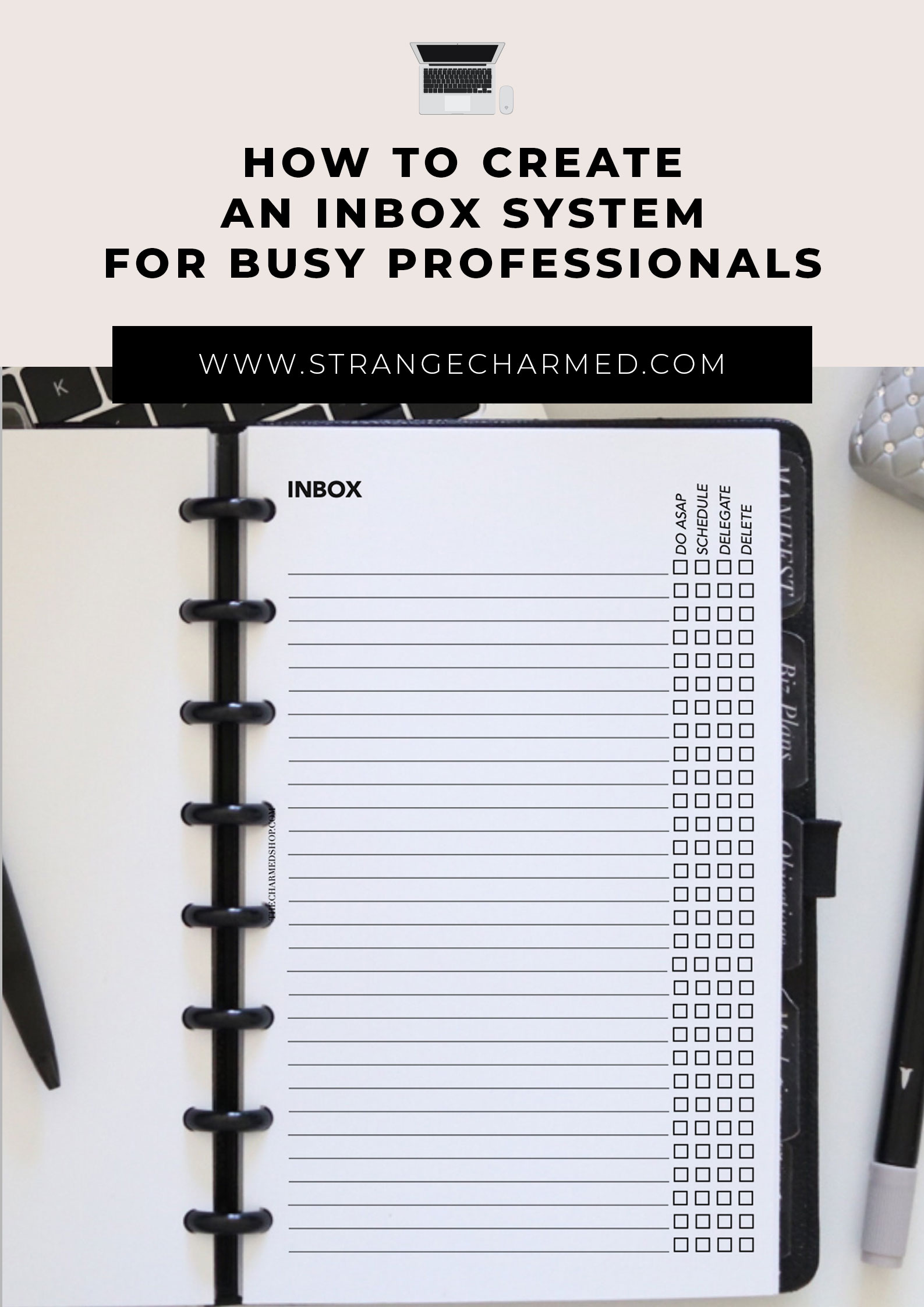
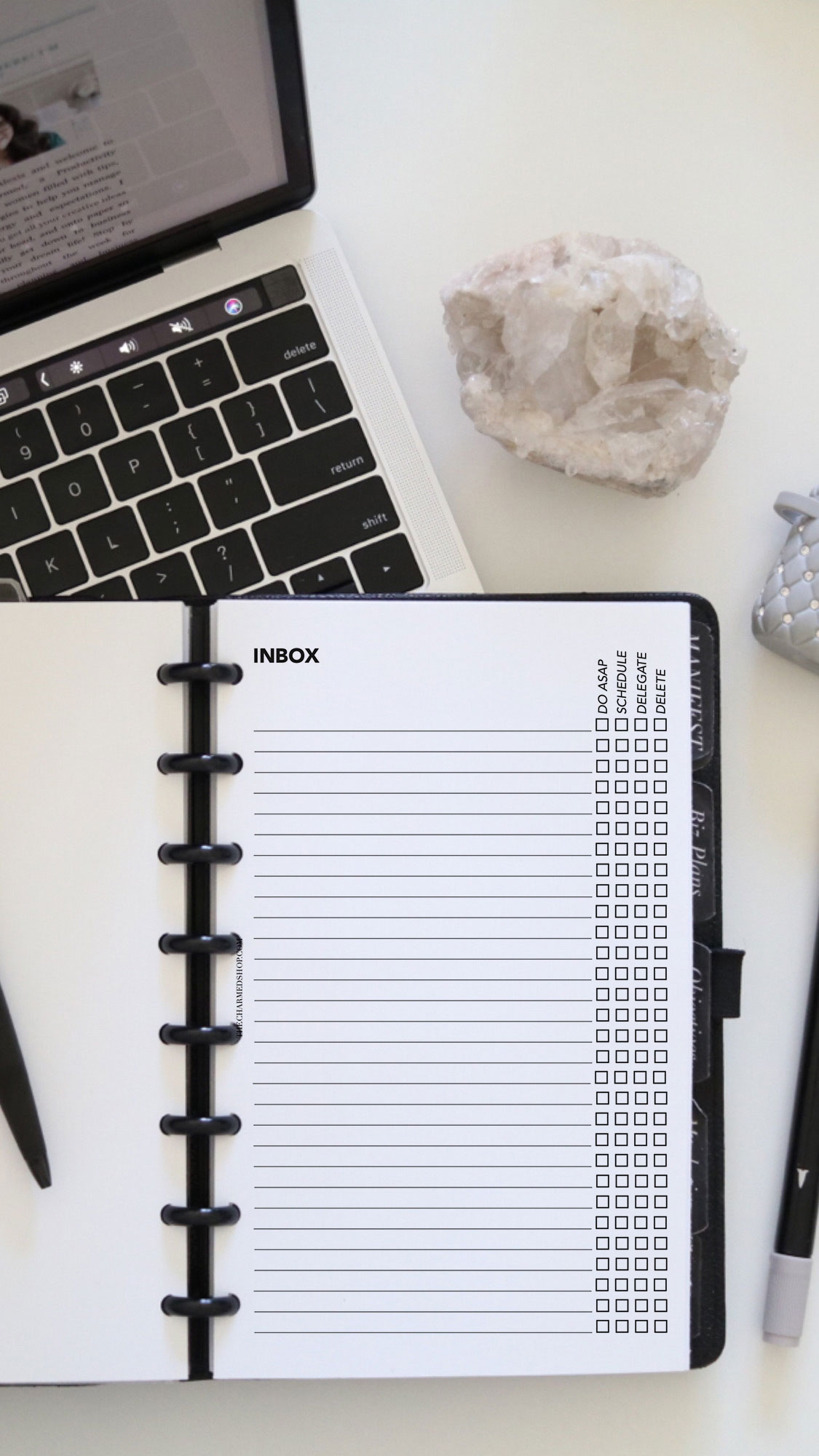
It would be optimal to capture new tasks in one centralized location, like an inbox page of your planner, a brain dump spread, or a specific file in a notes application, so you can then determine the priority of the tasks.
I determine the priority of my new tasks using an Eisenhower Matrix that evaluates tasks for urgency and importance. Any new tasks that are urgent and important will be integrated into my plan for the day, while other tasks of less urgency or less importance may be scheduled for another day or kept on a pending list for future reference.
For example: Urgent and Important Tasks | Do Now Not Urgent and Important Tasks | Schedule Urgent and Not Important Tasks | Delegate Not Urgent and Not Important Tasks | Delete
For any information you receive during the course of your workday, I think it’s important to have a separate system for organizing notes and reminders so you can quickly locate and use the information when you need it.
I recommend using a digital notes tool to organize this type of information especially if you are receiving it in digital form most of the time through messages and emails. It’s quite easy to simply copy and paste information, where as rewriting it onto a paper notes system may take a bit more time. Of course, if you prefer to be fully analog and use a paper notes system for this part of your overall system, do what works for you.
I use Apple Notes to organize raw information and ideas, because the app syncs across my laptop, iPhone and even my iPad so that I always have access to it, and because it is digital I can use the search function to quickly find information as well.
I keep my notes app organized by folders for different categories of information, like Personal Notes, Business, Marketing, Content, etc, and then I keep individual note files inside the folders to organize specific topics for quick reference.
If using a notes app doesn’t work for you, you could also use a Google Sheets file or spreadsheet application on your computer to organize information by category and topic as well.
If you’d prefer to use a paper based system, you could divide a notebook into sections for your categories, or include pages in your planner dedicated to specific categories or projects you need to retain information on to act on later.
Turning the System into a Routine
With your Inbox System set up, the next part of the process would be to define and establish a regular routine for transferring and reviewing information.
It’s not enough to have the system set up with the defined place for each type of task or information to go, but you also need to decide how often you are going to review your various other inboxes to transfer information into their appropriate place in your system, and how often you need to review those individual places to make sure you are utilizing the information you captured.
I generally check my inboxes (email, message systems etc) about twice a day, once in the morning at the start of my work and once in the afternoon before I stop working for the day, and that is the point where I will funnel tasks and information to their appropriate spots in my organization system.
Tasks get listed and organized with the Eisenhower Matrix, and information, reminders or ideas get organized to their appropriate folder or note in my Apple Notes.
I keep active notes for each of the classes, products and pieces of content I create so I can quickly transfer or capture information that pertain to each of these individual projects quickly, as soon as it comes to my attention.
When you initially start this routine, it will be a good idea to set alerts to ensure you use the system regularly, and then after a while, it will become a natural process you do as part of your day.
I hope this information helps you create your own organized inbox system to stay on top of your tasks and do your best work, no matter what you do! Let me know how it works out and if you have any questions and I’d be glad to help!