As you may have already heard, last Wednesday Apple announced the newest iteration of iPad. From what I am reading online and seeing on tv, it looks like the reception to the new iPad has been a mixed bag of feelings, with some excited about the new, albeit minimal changes that have taken place in this new model, while others consider the lack of thrilling new features and a distinctive number identification to be a clear sign of Apple’s impending demise without Steve Jobs. Thankfully, Joy of Tech has summed this up beautifully in their most recent comic which I have inserted below for your reading pleasure.
Of course, the irony of the whole back and forth, aptly captured within the comic, is that it appears that the release of this new iPad will be no less notable than any previous releases. When I myself attempted to preorder the new iPad via the website on Wednesday it took me no less than 45 minutes to do so as the servers were continually crashing due to the high volume of customers preordering their models as well. Quickly, the estimated delivery dates for the iPad changed from March 16th to March 19th, and although we can assume that the bulk of the preordering crowd has passed, I have a feeling that like last year, if you do not preordered or do not get in line nice and early on Friday for the in store release, you may find yourself unable to acquire an iPad for a few weeks.
Luckily, I was able to preorder myself a new iPad after what literally felt like an eternity of refreshing pages, but unfortunately for me, I am not going to pick my order up from a store, which I had originally intended to do, but instead my new iPad will be delivered to me at home. This is because my perfect plans were shattered when I found myself at a page in the ordering process that I did not plan on. I found myself face to face with an option for a free engraving, which I completely forgot was offered on previous iPad models. Of course, I could not pass on this excellent deal. After all, it was free, and a way to distinguish my iPad from the hordes of others out there in the world. If there were any future confusion over which iPad were my own, I only need specify the engraving on the back which would instantly prove my ownership of the device. Yes, I know there are serial numbers and such for this exact purpose but nothing is so instant as to say, “excuse me, that is my iPad, I can prove it, the back is engraved with the following…” and you can see where I am going with this. So, of course, once I selected the engraving option, I was locked into a direct delivery option instead of being able to pick up my unit in store. I was looking forward to making a video and posting about my in-line experience, but I guess I will have to wing it at home with an instant unboxing, which will have to do.
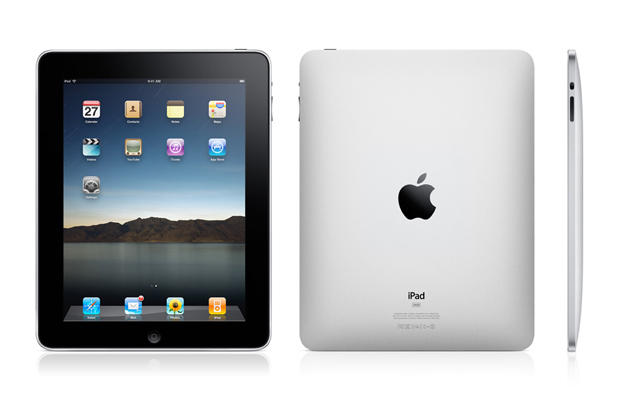
Now that I have gushed about the reception of the new iPad and provided my own little anecdote as to the ordering process, lets discuss the actual iPad itself. Apple has dubbed this newest model “Resolutionary” which has caused some rumbling from the peanut gallery as to how revolutionary the resolution really is, but lets look at the facts. Apple revolutionized the iPhone display with its Retina Display, which basically means that the pixel density is so high, your eye can’t tell the difference between pixels at a normal reading distance. That was pretty revolutionary for a phone. Now, Apple has done the same thing for an iPad, a device that is not only in a completely different category than the iPhone, but also has a display that is multiple times larger than a phones. And this wasn’t a matter of Apple making a bigger version of the iPhones Retina Display, but rather, they now needed to completely redesign the display in order to make it work on a larger scale. That is a pretty revolutionary resolution if you ask me.
Now, the second upgrade to the iPad is an iPhone quality iSight camera and an improved FaceTime camera. From all accounts, the iPad 2 had two terrible cameras, which provided nothing more than a novelty, but these new cameras which include full 1080p HD video capture are really going to effect day to day use of the iPad. As a blogger, I am excited that I can now use one device to capture images, video and data input on the go. Yes, I have a great camera that I use for pictures and videos, but on the go it is not as feasible to use my camera and then send the photos to my iPad for input into my blog. Normally, I achieve this by taking photos and video with my phone and uploading them into the cloud which I then pull down into my iPad, but again, this is many extra steps which I will now be able to skip because my iPad will be an all in one device. I am very excited to see how the iPad improves my blogging because I predict it will greatly simplify things for me.
The final major upgrade to the iPad is of course the 4G LTE wireless capability. Along with this, however, is notably an increased battery performance and the A5x processor to support not only the 4G technology, but also the Retina Display. For a while 4G was a wished for addition to not only the iPad but the iPhone as well. This 4G capability is significant, because Apple has added the widest variety of wireless signals to the iPad than ever before. Apple has integrated 4G LTE CDSM and GSM technology into their cellular antenna, which includes UMTS and GPS as well as Wireless and Bluetooth capability. Basically, this one device is ready for anything which is really amazing.
With all this new technology we are also seeing another first for Apple, and that is the increase in body size and weight for the new iPad. Although we are talking only fractions of inches and pounds, this is a milestone for Apple because they have really made a choice that they value the increase in technology more than the super slim form factor, which for the end user really enhances the experience more than the body design does. I know all these changes don’t seem so amazing to everyone, but as I predicted last year at the announcement of the iPad 2, there is not much else we can expect from the iPad line except for gradual increases in quality and technology. Apple got so much right with the first iPad that there wasn’t much improvement they needed to make aside from the addition of the cameras. From here on out we can expect to see small changes that will increase quality of the device and bring it up to speed with emerging technologies for connectivity and user experience. The iPad truly is a revolutionary device, and if you are still holding out or on the fence, I say jump on the bandwagon and get yourself an iPad, I doubt you will regret it!